Lab Overview
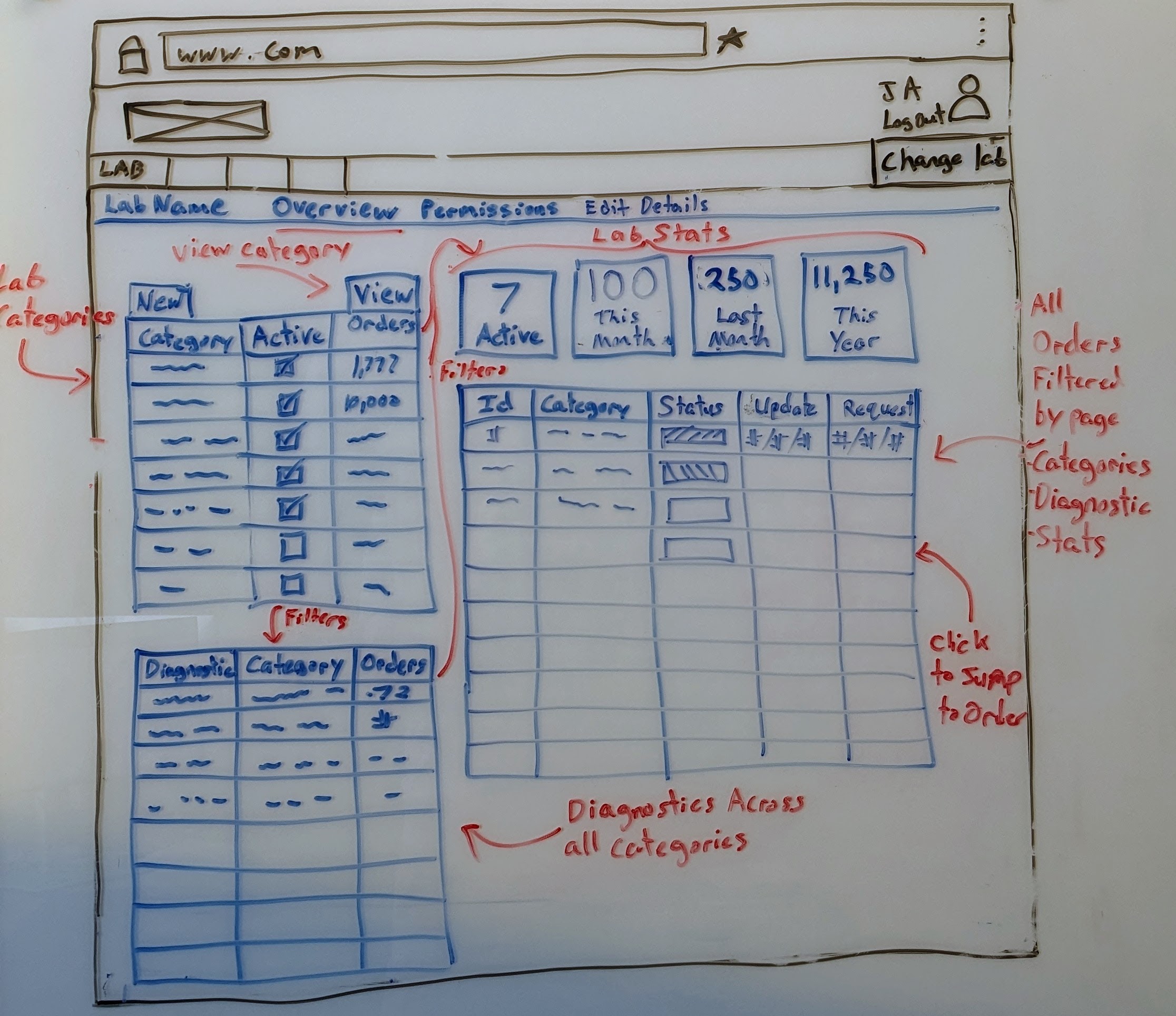
| Color | Purpose |
|---|---|
| Blue | The page content the wireframe is trying to convey. |
| Red | Descriptions of features shown in the wireframe for clarity. |
| Black | Web browser template |
Purpose
The overview is a lab's dashboard, showing a list of all Orders, Categories, and Diagnostics, as well as some Order statistics.
The Overview page complements the Order Queue, allowing the Queue to focus on active Orders.
The primary purpose of this page is to manage Lab Categories. A Lab Manager or user with correct permissions will be shown the New button located above the Lab Categories table, and will have access to create and modify Lab Categories.
The secondary purpose of this page is to view the lab's Orders, Lab Categories, and Diagnostics at a glance allowing for quick filtering. Clicking on nearly anything on this page will filter other parts of the page by that item. For example: clicking on Lab Category Hematology will filter the Diagnostics, Lab Stats, and Orders to those that are available to Hematology.
Actions
The actions a user can do on this page:
Filtering
On this page there are Lab Categories, Diagnostics, Orders, and Lab Stats.
Clicking on a Lab Category will filter Diagnostics, Orders, and Lab Stats to show only those related to the Lab Category.
Clicking on a Diagnostic will filter Orders and Lab Stats to show only those related to that Diagnostic.
Clicking on a Lab Stat will filter Orders to show only those related to that stat.
Any column on the Orders table can be filtered.
Exporting
All tables can be exported and saved to a variety of tabular file formats.
Lab Category
Those with correct permissions can create new Lab Categories.
Related Wireframes
| Name | Reason |
|---|---|
| Lab Category -> Settings | The page that the user is redirected to when viewing a Lab Category. |
| Diagnostic Order | The page that the user is redirected to when clicking on an Order. |