Part 2: From Form to Job Script
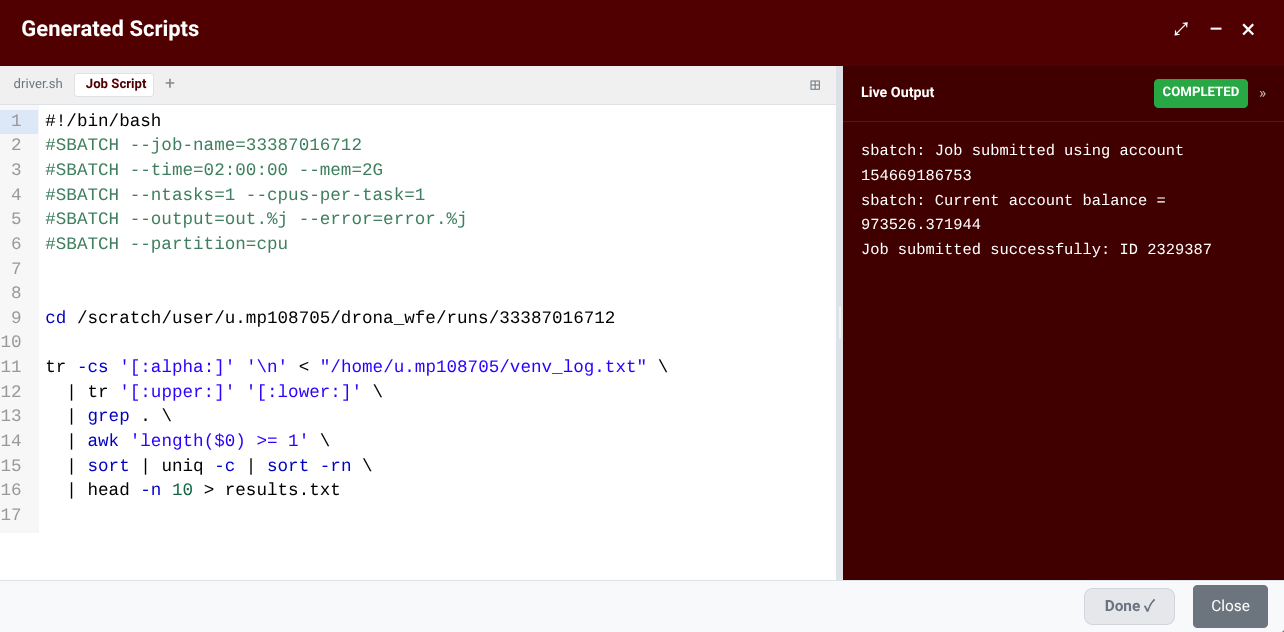
When the user clicks Generate, Drona turns the form values into scripts and shows them in the Generated Scripts window. Three files take part: the map decides what each placeholder becomes, utils.py does the checks and calculations, and the job script uses the placeholders.
The Map: map.json
{
  "$include": [
    "drona_slurm_params"
  ],
  "JOBNAME": "$name",
  "DRIVER": "!select_driver($drona_create_manage_mode)",
  "INPUT_FILE": "!check_input($input_file, $drona_create_manage_mode)",
  "TOP_N": "!check_top_n($top_n)",
  "FILTER": "!build_filter($filter_short, $min_length)",
  "MANAGE": "!retrieve_workflow_actions($drona_create_manage_mode, $drona_delete_workflow, $drona_delete_files, $drona_create_manage_allworkflows, $drona_job_dir)"
}
Each key on the left becomes a placeholder: "TOP_N" fills every [TOP_N] in your scripts. The value on the right says where it comes from. There are three kinds.
Form Values
"JOBNAME": "$name"
A $ followed by a field name is that field's value as the user entered it. $name comes from the job name and location element of Part 1.
The location needs no map entry: Drona writes the scripts to the run's directory and starts the driver there, and Slurm starts the job in the same directory. If a script does need the absolute path, add "flocation": "$location"; Drona quotes it for the shell, so a directory with spaces in its name still works.
Function Calls
"INPUT_FILE": "!check_input($input_file, $drona_create_manage_mode)",
"TOP_N": "!check_top_n($top_n)",
"FILTER": "!build_filter($filter_short, $min_length)"
A value that starts with ! calls a Python function in utils.py, with form values as its arguments. Its return value fills the placeholder. The function can also check the values and show messages, which is how WordCount validates its input.
DRIVER and MANAGE are function calls too; they belong to running the job and are covered in Part 3.
Shared Slurm Settings
"$include": [
  "drona_slurm_params"
]
$include adds entries from a shared map in the Drona Runtime Library. drona_slurm_params reads the shared resource fields, drona_memory and drona_walltime from Part 1, checks them against your cluster's limits, and creates these placeholders:
| Placeholder | Contains |
|---|---|
[TIME] | the run time, for example 02:00:00 |
[MEM] | the memory, for example 2G |
[TASKS], [CPUS] | the number of tasks and CPUs per task |
[PARTITION] | a complete #SBATCH --partition=… line, chosen for the request, or nothing |
[EXTRA] | any extra #SBATCH lines, or nothing |
If your site has no profile for the cluster, Drona can't check the values and shows a note saying so. A site adds one as described in Cluster Profiles.
utils.py: Checks, Messages and Choices
Each function receives form values as text and returns the text for its placeholder. A field the user left empty arrives as an empty string, so every function handles that case.
from drona_utils import drona_add_additional_file, drona_add_error, drona_add_warning
drona_add_error and drona_add_warning add an error or a warning to the message pane above the scripts; drona_add_note adds a note. Drona still lets the user run the scripts, so the messages are there to explain what needs fixing. drona_add_additional_file is used in Part 3. Utility Functions lists everything drona_utils offers.
Checking the Input File
def check_input(input_file, mode):
    if mode == "create" and not input_file:
        drona_add_error("Choose a text file to analyze.")
    return input_file
An empty file name is an error when creating a run. The function also receives the mode, because the Manage page has no input file and must not show this error. The value itself passes through unchanged.
Checking the Number of Words
def check_top_n(top_n):
    count = int(top_n) if top_n else 10
    if count > 100:
        drona_add_warning(f"You asked for {count} words. The report may be long.")
    return str(count)
An empty field falls back to 10. A very long list isn't wrong, so it gets a warning rather than an error.
Building the Filter
def build_filter(filter_short, min_length):
    if filter_short != "Yes":
        return ""
    length = int(min_length) if min_length else 4
    return f"| awk 'length($0) >= {length}'"
This returns a piece of shell pipeline, or nothing. When Ignore short words is unchecked, the function returns an empty string, so a length left over in the hidden field has no effect. When it is checked, awk keeps only the words of at least that length.
Drona reloads utils.py for every preview, so you can edit it and click Generate again without restarting anything.
The Job Script: jobscripts/word-count.slurm
This is the job that runs on the cluster. Drona replaces each placeholder with its value from the map.
#!/bin/bash
#SBATCH --job-name=[JOBNAME]
#SBATCH --time=[TIME] --mem=[MEM]
#SBATCH --ntasks=[TASKS] --cpus-per-task=[CPUS]
#SBATCH --output=out.%j --error=error.%j
[PARTITION]
[EXTRA]

tr -cs '[:alpha:]' '\n' < "[INPUT_FILE]" \
  | tr '[:upper:]' '[:lower:]' \
  | grep . \
  [FILTER] \
  | sort | uniq -c | sort -rn \
  | head -n [TOP_N] > results.txt
The #SBATCH lines are Slurm's settings for the job (lines 2–7):
#SBATCH --job-name=[JOBNAME]
#SBATCH --time=[TIME] --mem=[MEM]
#SBATCH --ntasks=[TASKS] --cpus-per-task=[CPUS]
#SBATCH --output=out.%j --error=error.%j
[PARTITION]
[EXTRA]
- The job name, time, memory and CPUs all come from the map. In the screenshot,
[PARTITION]became#SBATCH --partition=cpuand[EXTRA]an empty line. out.%janderror.%jcollect the job's output and errors, with%jreplaced by the job ID.
The work itself is one pipeline (lines 9–14). It runs in the run's directory, where Slurm starts the job, so results.txt is written there:
tr -cs '[:alpha:]' '\n' < "[INPUT_FILE]" \
  | tr '[:upper:]' '[:lower:]' \
  | grep . \
  [FILTER] \
  | sort | uniq -c | sort -rn \
  | head -n [TOP_N] > results.txt
- The first
trsplits the text into one word per line, treating anything that isn't a letter as a separator. - The second
trlowercases every word, so "The" and "the" count as one. grep .drops empty lines.[FILTER]is either nothing or theawkfilter frombuild_filter.sort | uniq -c | sort -rncounts each word and sorts by count, highest first.head -n [TOP_N]keeps the top words and writes them toresults.txt.
Text in brackets that isn't a map key, such as [:alpha:], is left alone, so normal shell syntax is safe.
This file isn't named template.txt, the name Drona uses for an environment's default job script, because WordCount only needs it in Create mode. utils.py adds it to the run itself, as you'll see in Part 3. It then appears as the Job Script tab.
Try It
- Pick a file and click Generate. Open the Job Script tab and check that every placeholder has a value.
- Clear the file and generate again: an error appears in the message pane.
- Ask for 500 words: a warning appears.
- Check and uncheck Ignore short words, and compare the pipelines.
If you see a literal [SOMETHING] in a script, that placeholder has no entry in map.json. Names are case-sensitive.
Next: Part 3: Submit the Workflow.